Workflow Automation Software: How to Choose
By Kirill Stolbushkin
Workflow automation software is software that moves tasks, data and approvals between people and systems according to rules you set. To choose one, start with the process, not the feature list: know the systems involved, who will maintain it and how exceptions are handled. Then pick the tool type that fits.
Describe your process in plain English and get a BPMN map, no account needed.
What's workflow automation software?
It's software that runs a defined sequence of tasks for you: when something happens, it does the next step, routes work to the right person, or passes data to another system. It differs from process modeling, which describes how the work should run, and from BPM, which manages processes across their whole lifecycle.
A useful way to see it: a workflow is the "then" part. A form is submitted, then a task is created. A deal closes, then a folder is set up and a welcome email goes out. The software watches for the trigger and carries out the steps.
Wikipedia's entry on workflow management systems describes the classic version as infrastructure for setting up, performing and monitoring a defined sequence of tasks. The word that matters is "defined". The software runs what you tell it to run. It doesn't decide what the process should be.
That's why the choice of tool depends so much on how clear the process already is. If you know the steps, the owners and the exceptions, almost any decent tool will work. If you don't, the tool will faithfully automate whatever confusion you hand it.
What are the main types of workflow automation tools?
There are five broad types: trigger-action connector tools, form-and-approval tools, low-code app builders, BPM suites and process modeling platforms. They overlap, but each is built for a different job. Picking the right type matters more than picking the best product inside the wrong type.
Type | Best for | Limits |
|---|---|---|
Trigger-action connector tools | Moving data between SaaS apps when an event happens | Weak at long processes with people, decisions and exceptions |
Form-and-approval tools | Requests that need one or two approvals | Hard to extend once the process grows more branches |
Low-code app builders | Custom internal apps with forms, data and routing | Someone has to design and maintain the app |
BPM suites | Large, cross-team processes with formal governance | Heavier to set up, usually run by IT |
Process modeling platforms | Mapping and documenting the process before or alongside automation | Not a connector engine; the value is clarity first |
The lines blur. Some connector tools have added forms. Some modeling platforms can build apps. Use the table to decide which job you're hiring the tool for, then check the specific product against that job. If you're weighing a mapping tool against a full BPM suite, we compared the two in process mapping tool vs BPM platform.
What should you check before you choose?
Check six things: the connectors you actually need, who will build and maintain it, how it handles exceptions, access control and SSO, the cost model as usage grows, and how you get your work out if you leave. Skipping one of these causes more trouble later than picking a weaker product.
Connectors you actually need. List the systems in your process first, then check the tool against that list. A long connector catalog doesn't help if your two important systems are missing.
Who builds and maintains it. Decide whether operations, a team lead or IT owns the automations. A tool only one person can change becomes a risk when that person is busy or leaves.
Exception handling. Ask what happens when a step fails, data is missing or a case doesn't fit the rules. Look for clear failure alerts and a way to route odd cases to a person.
Access control and SSO. Check who can see, edit and run each workflow, and whether sign-in follows your company identity setup.
Cost model. Understand what you pay for: users, runs, tasks or steps. Estimate cost at your expected volume, not the trial volume.
Exit path. Find out whether you can export your workflows and process documentation in a usable format, so switching later is work rather than a rebuild.
If you're running a formal selection, turn these six checks into a scored list and test each finalist against the same real case.
When is a dedicated workflow tool the better pick?
When the process is already clear and the job is mainly moving data between SaaS apps, a connector-first workflow tool is usually faster and simpler. It's also the better pick when you need many prebuilt app connectors, quick trigger-action automations, or when IT already runs an automation stack you should build on.
Say a new form entry should create a record, notify a channel and add a row to a sheet. There's no real decision in that. There's no exception path worth mapping. A connector tool will have it running quickly, and anything heavier would be overkill.
The same goes for teams that already have a working automation stack. If IT has standards, reviewed connectors and monitoring in place, adding a separate platform for simple automations creates more to maintain. Build on what exists.
We say this plainly because it's true: a process modeling platform isn't a replacement for connector tools. If your problem is "these two apps don't talk to each other", fix that with a tool built for it. We went through where each approach fits in Vevos AI vs Zapier.
When should you map the process before picking a tool?
Map first when the steps differ depending on who does them, when exceptions live in people's heads, or when several teams touch the process. In those cases the hard part is agreeing what the process is. Any tool you pick before that agreement will encode one person's version.
Signs you need the map first:
Two people describe the same process differently, and both are right for their cases.
Nobody can say what happens when a request is incomplete, late or over a limit.
The process crosses teams, and each team owns a piece but nobody owns the outcome.
You need documentation anyway, for training, compliance or a new hire.
A BPMN map makes decisions, owners and exception paths explicit. Once it's reviewed, choosing a tool gets easier, because you can see which parts are simple data moves and which parts need people, rules and a real app.
Vevos fits here: it generates a BPMN map and docs from a description or document, your team reviews and versions it, and on Tempo and above, Conductor Agents build and deploy an app from the reviewed model. For how that build step works, see how a reviewed BPMN model becomes a working app.
What changes for small businesses?
Small businesses need fewer tools, one clear owner for each workflow, and something the team can change without waiting for IT. The checklist is the same, but the weight shifts toward simplicity: a tool the owner understands and can fix in an afternoon beats a powerful one nobody on the team can maintain.
Practical rules for a small team:
Start with one process. Pick the one that annoys people most often, map it, then automate it.
One owner per workflow. Write the owner's name on the map. When something breaks, everyone knows who to ask.
Fewer tools. Each new tool is another login, another bill and another place where a workflow can fail quietly.
Keep it editable. Rules change as the business grows. If changing a threshold means calling a contractor, the tool is too heavy for now.
Workflow automation for small business is less about capability and more about upkeep. The best tool is the one still working, and still understood, six months from now.
What does choosing a tool look like for client onboarding at an agency?
Take client onboarding at a marketing or design agency. Map it first: contract signed, kickoff scheduled, access and assets collected, project set up, first invoice sent. Then sort the steps. Simple data moves suit a connector tool. The steps with decisions, chasing and exceptions suit a built app with a clear owner.
The map. The trigger is a signed contract. The account lead schedules the kickoff. The client is asked for brand assets and account access. Operations sets up the project and folders. Finance sends the first invoice. Exceptions: the client sends assets late, the scope changed between proposal and contract, or the client needs a different billing setup.
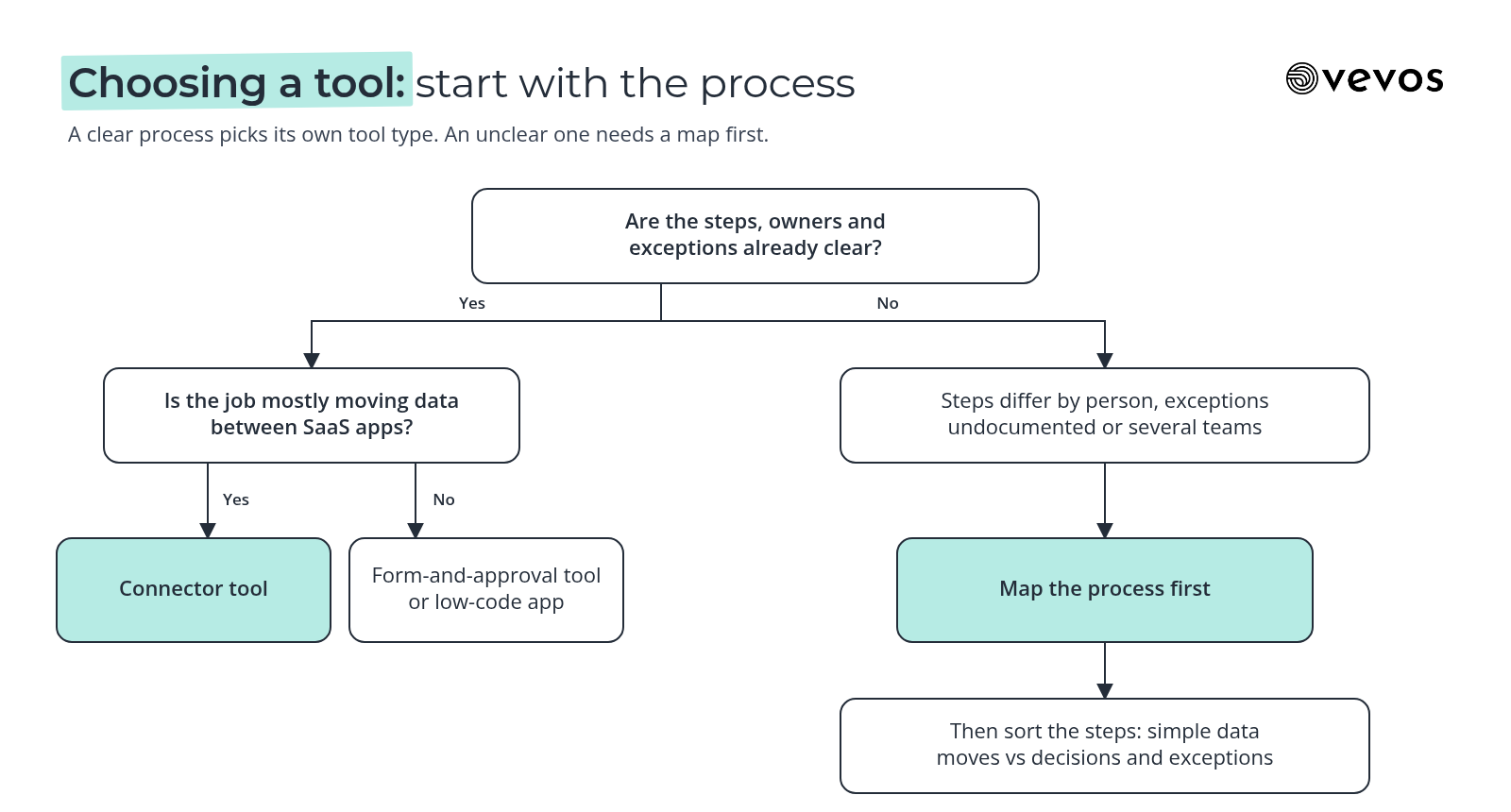
What suits a connector tool. Creating the project folder when the contract is signed. Adding the client to the project tool. Posting a notice to the team. These are clear trigger-action steps with no decision in them.
What suits a built app. The asset and access collection, with reminders, a checklist the client can see and a route to the account lead when something is late. The scope check, where someone compares the contract against the proposal before work starts. The billing exception path. These steps involve people, judgment and follow-up, so they need a defined owner and a place to track status.
Why the map helped. Without it, the agency might have bought a connector tool and still had onboarding stall at the asset step. With it, they can see the split. The client onboarding process guide has the full step list if you want to map your own.
How do you measure whether the tool worked?
Track four things against how the process ran before: cycle time, manual touches, failed runs and time to change a rule. The first two show whether work got faster and lighter. The last two show whether the automation is reliable and whether you can still adapt it when the business changes.
Cycle time: from trigger to finished outcome. For onboarding, from contract signed to project kicked off.
Manual touches: how many times a person has to step in for a typical case. Fewer touches on the routine path is the goal. Touches on real exceptions are fine.
Failed runs: how often an automation errors out or stalls. Check whether failures alert someone or fail quietly.
Time to change a rule: how long it takes to update a threshold, add a step or change an owner. If this keeps growing, the tool is getting harder to own.
Take a rough baseline before you switch anything on. A week of sampled cases is enough to compare against.
Frequently asked questions
What's the difference between workflow automation and BPM?
Workflow automation routes tasks and data between people and systems by rules. Business process management is broader: it covers designing, documenting, running, measuring and improving processes over their whole lifecycle. A workflow tool can be one part of a BPM approach, but BPM also includes ownership, modeling and ongoing review of how the work is done.
Is Vevos a workflow automation tool?
Vevos can call a small set of outside tools through connectors your admin approves, and more are coming. It isn't built for trigger-action automation between apps, so use a dedicated tool for that.
Do I need coding skills?
It depends on the tool type. Trigger-action connector tools and form-and-approval tools are usually built for non-developers. Low-code app builders need someone comfortable with logic and data, though not necessarily code. BPM suites are usually set up and run by IT. Process modeling platforms need process knowledge rather than coding.
How many connectors do I need?
Only as many as your process uses. Map the process first and list every system that appears in it, such as email, files, a calendar or a project tool. Then check each tool against that short list. A tool with fewer connectors that covers your actual systems is a better fit than a bigger catalog that misses them.
Can I use more than one tool?
Yes, and it's a common setup. Teams often pair a process modeling tool, where the process is mapped, reviewed and documented, with a workflow tool that handles the simple data moves between apps. The map keeps everyone agreed on how the work runs, and each tool does the job it's built for.
Pick the job first, then the tool
Vevos is the AI Playbook for how companies run. Before you compare workflow automation software, write down the process you want to automate, review it with the people who do the work, and sort the steps into simple data moves and real decisions. The right tool type usually becomes obvious. Today, Vevos can call a small set of outside tools through connectors your admin approves. Outside AI agents calling Vevos to run your processes are coming.
Describe your process in plain English and get a BPMN map, no account needed. You can start free on Intro. See current limits on the pricing page. Pulse is $9 a month, Rhythm is $29 a month for up to 4 users, and Tempo, where Conductor Agents build apps, is $199 a month.
Related blog posts
- As-Is vs To-Be Process Mapping: How to Map Today and Tomorrow — How to capture the process you really run, design the one you want, and turn the difference into a short gap list with owners, using a facilities work order process as the example.
- AI-Ready SOPs: How to Write Procedures That AI Can Follow — The machine-readable side of SOP writing: one action per step, conditions written as rules, exceptions as named paths, and a simple test to see whether an assistant can follow yours.
- The AI Playbook: What It Is and How to Build One — A working record of your processes, owners, rules and exceptions that new hires and AI assistants can both use, with steps to build the first version.