AI-Ready SOPs: How to Write Procedures That AI Can Follow
By Kirill Stolbushkin
An AI-ready SOP is a standard operating procedure that states its trigger, inputs, decisions, exceptions and owners explicitly, so a person or an AI tool can follow it without guessing. It's the same SOP you'd write for a new hire, with the judgment calls turned into written rules and the edge cases given real paths.
Describe your process in plain English and get a BPMN map, no account needed.
What makes an SOP AI-ready?
An SOP is AI-ready when nothing important is left implied. Every step has one action, every decision has a written condition, every exception has a named path and owner, and the inputs and outputs are named. If a careful reader could follow it without asking anyone a question, an AI tool usually can too.
This post assumes you already know how to write a decent SOP. If you don't, start with our guide on how to write an SOP, which covers purpose, scope, roles and format. If you're unsure whether you need an SOP, a work instruction or a process map, see SOP vs work instruction vs process map.
What's different here is the reader. A new hire can ask a colleague what "check with finance if it looks high" means. An AI tool can't, so it either guesses or stops. An AI-ready SOP removes the need to ask.
Quality | Typical SOP | AI-ready SOP |
|---|---|---|
Trigger | Implied ("when a request comes in") | Named ("when an expense claim is submitted in the expense tool") |
Steps | Several actions per step | One action per step |
Decisions | "Use judgment" | Written conditions with outcomes |
Exceptions | A footnote, if anything | Named paths with owners |
Inputs and outputs | Unstated | Listed for each step |
Version | Unclear which copy is current | One current version with history |
Why do most SOPs fail when AI reads them?
Most SOPs were written for people who already know the job. They rely on implied judgment, skip the exceptions, use vague verbs like "review" or "handle", and often exist in several copies with no clear current one. A person fills those gaps from experience. An AI tool fills them with a guess.
The common failure points:
Implicit judgment. "Escalate if needed" doesn't say when it's needed.
"Use common sense" steps. Common sense isn't written down anywhere a tool can read.
Missing exceptions. The SOP covers the normal case and stops.
Bundled steps. "Check the receipt, confirm the policy and pay the claim" is three steps, each with its own failure case.
Stale versions. The tool reads last year's copy because it's the one it found.
None of these is an AI problem. They're documentation problems that people have been working around for years. AI just makes them visible faster.
How do you write steps an AI can follow?
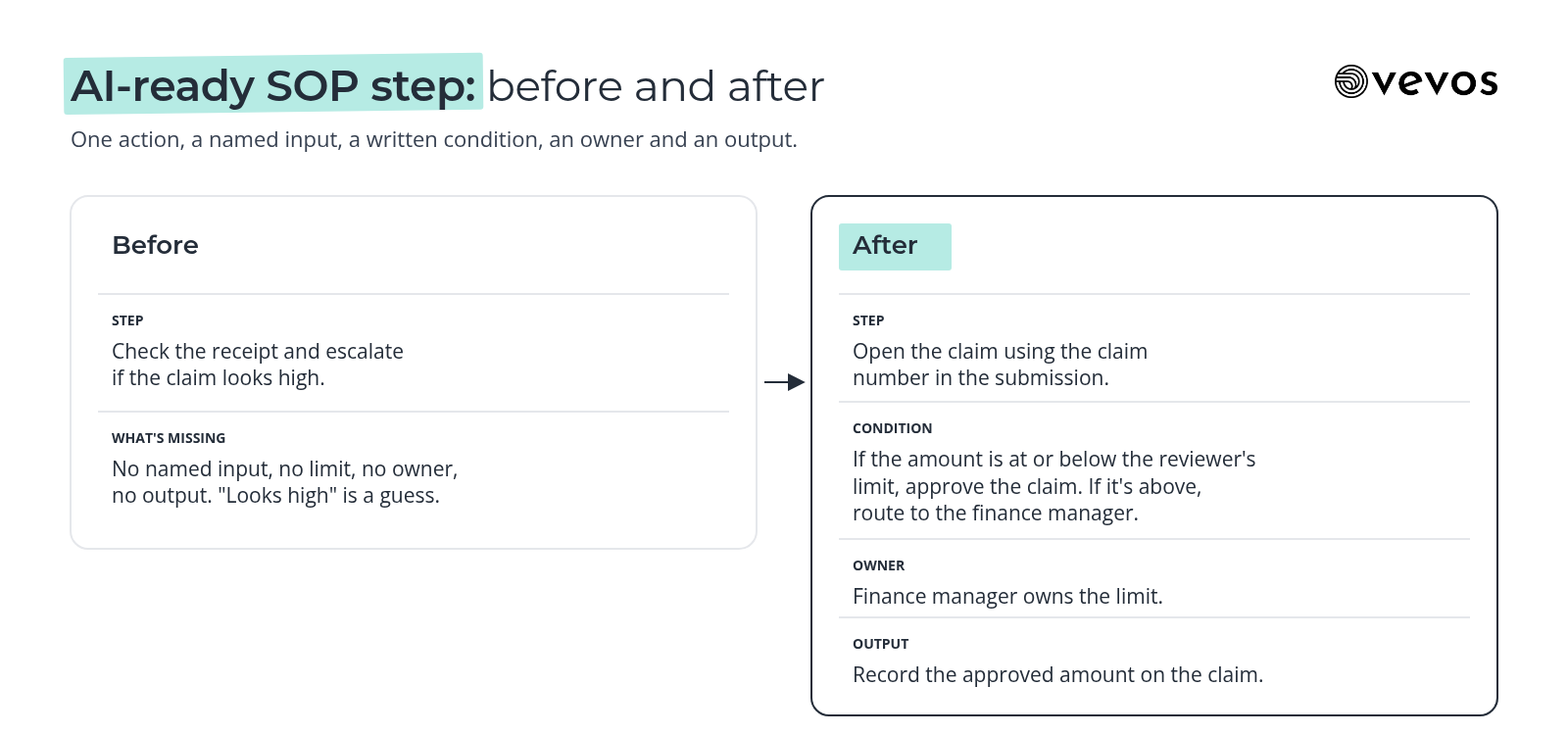
Write one action per step, start each step with a verb, name the input it uses and the output it produces, and turn every decision into an explicit condition: if this, then that, otherwise something else. Keep thresholds as numbers your company sets, not adjectives like "large" or "unusual".
One action per step. "Open the receipt" and "check the expense category" are separate steps.
Start with a verb. Look up, compare, send, approve, record.
Name the input. "Using the claim number from the submission" beats "using the details".
Name the output. "Record the approved amount on the claim" says where the result goes.
Write conditions as rules. "If the amount is above the reviewer's limit, route to the finance manager. Otherwise, continue."
Name the owner of each decision. A role, not "someone".
Say what done looks like. The last step states the end state, like "claim paid and employee notified".
A good test while you write: could you turn each decision into a yes or no question? If not, it's not a rule yet.
How should you handle exceptions and escalations?
List exceptions as named paths, each with a trigger, an owner and an end state, not as footnotes. "Missing receipt, claim older than the submission window" is an exception with its own path. An escalation should say who it goes to, what they need to decide and what happens after.
For each exception, write four things:
The trigger. What makes this case different.
The owner. Who decides.
The action. What they do, in steps.
The return. Whether the case rejoins the main path or ends.
Keep exceptions in the SOP itself, in their own section, rather than in a separate document nobody opens. And if an exception keeps coming up, it may not be an exception anymore. Move it into the main path.
For anything with real risk, like payments, claims above a limit or account changes, say plainly that a person decides. NIST's AI Risk Management Framework, a voluntary framework for managing AI risk, is a useful reference when you're deciding where people should stay in the loop.
Why does a process map help an AI-ready SOP?
A process map forces explicit decisions. In BPMN, every decision is a gateway with labeled outcomes, so "use judgment" has nowhere to hide. Drawing the map exposes missing exceptions and bundled steps quickly, and the map and the written SOP check each other: if they disagree, one of them is wrong.
You don't need a map for every SOP. But for anything with more than a couple of decisions, drawing it is the fastest way to find the gaps. We covered the conversion itself in SOP to BPMN.
Vevos turns an existing SOP or a plain description into a BPMN map plus written docs, and keeps version history with a visual diff as the procedure changes. Outside AI agents calling Vevos to follow your processes are coming. Today, write SOPs so any assistant you already use can read them correctly.
How do you keep an AI-ready SOP current?
Give each SOP one owner, one current version and a list of change triggers: a new threshold, a new system, a new team or a repeated question the SOP didn't answer. Keep the old versions so you can see what changed. A stale SOP is worse for an AI tool than none, because it'll follow it confidently.
One owner. The person who approves changes and answers for accuracy.
One current version. Retire or clearly mark old copies.
Change triggers. Update when the work changes, not just on a schedule.
A review date as a backstop. For SOPs that rarely change.
For the habits that keep documentation current without a big effort, see our guide on keeping process documentation up to date.
What does an AI-ready expense claim SOP look like?
Take an expense claim SOP. The typical version says to check the receipt, use judgment on the amount and escalate if needed. The AI-ready version names the trigger, splits the steps, writes the limit as a rule, names who decides above it and lists the exceptions as their own paths.
Before | After | |
|---|---|---|
Trigger | "When someone submits expenses" | "When an expense claim is submitted in the expense tool" |
Step 1 | "Check the receipt and the category" | "Open the claim using the claim number in the submission" |
Step 2 | "Confirm the category is one of: travel, meals, equipment" | |
Decision | "Use judgment on larger amounts" | "If the amount is at or below the reviewer's limit, approve the claim. If it's above, route to the finance manager" |
Exception | "Escalate unusual cases" | "Claim outside the submission window: route to the finance manager with the expense date" |
Exception | "Receipt already used on another claim: hold the claim and route to the finance manager" | |
Output | "Pay the claim" | "Record the approved amount on the claim, notify the employee, send it to the next payment run" |
Owner | Not stated | "Support team lead owns this SOP and its limits" |
The company sets the actual limit and window. The SOP just has to state them. Once it does, a new reviewer and an AI assistant reading the SOP give the same answer to "can I approve this?"
How do you test whether an SOP is AI-ready?
Give the SOP to an AI assistant and ask it edge-case questions: what happens if the amount is just over the limit, if the claim is outside the window, if the category isn't on the list. Check whether each answer points to a real step. Vague or invented answers show where the SOP still has gaps.
A simple test run:
Pick five edge cases from real tickets, including at least two exceptions.
Ask the assistant what to do in each case, using only the SOP.
Check each answer against the steps. Does it cite a real step or condition?
Mark the gaps. Any answer that hedges, guesses or invents a rule points to a missing condition.
Fix and repeat. Update the SOP, then run the same five cases again.
Also ask a new hire to do the same. If a person and an assistant both get it right from the page alone, the SOP is ready.
Frequently asked questions
What is an AI-ready SOP?
An AI-ready SOP is a standard operating procedure written so a person or an AI tool can follow it without guessing. It names the trigger, uses one action per step, writes decisions as explicit conditions, lists exceptions as named paths with owners and keeps one current version. It's a normal SOP with nothing important left implied.
Can AI agents follow SOPs today?
General AI assistants can read a clear SOP today and answer questions from it, while a person still acts on the answer. Outside AI agents calling Vevos to follow your processes are coming. Until then, write SOPs as if an agent will read them, with explicit rules, named exceptions and clear points where a person decides.
Do AI-ready SOPs need BPMN?
No. A well-written SOP can be AI-ready on its own. But a BPMN map helps, because every decision becomes a gateway with labeled outcomes, which exposes vague steps and missing exceptions. For SOPs with several decisions or hand-offs, drawing the map is usually the fastest way to find what the text leaves out.
What format is best for an AI-ready SOP?
Use clear headings, numbered steps with one action each, conditions written as if and then rules, a separate exceptions section and a named owner. Plain text or a simple document works. Avoid burying rules in long paragraphs, screenshots or tables without labels, because both people and AI tools read structured text more reliably.
How often should you review AI-ready SOPs?
Review an SOP whenever its triggers change: a new threshold, system, team or a repeated question it didn't answer. Add a set review date as a backstop, such as every six months for stable procedures. The owner should check the current version and keep older versions so changes stay easy to trace.
Write it once, clearly
Vevos is the AI Playbook for how companies run. Pick one SOP that people ask about often, rewrite its decisions as rules, give its exceptions real paths and test it with five edge cases. Today, Vevos can call a small set of outside tools through connectors your admin approves. Outside AI agents calling Vevos to run your processes are coming.
Describe your process in plain English and get a BPMN map, no account needed. You can start free on Intro. See current limits on the pricing page. Pulse is $9 a month, Rhythm is $29 a month for up to 4 users, and Tempo, where Conductor Agents build apps from the reviewed model, is $199 a month.
Related blog posts
- As-Is vs To-Be Process Mapping: How to Map Today and Tomorrow — How to capture the process you really run, design the one you want, and turn the difference into a short gap list with owners, using a facilities work order process as the example.
- Workflow Automation Software: How to Choose — A decision guide to the five kinds of workflow tools, the checks that matter before you buy, and how to tell whether you need a tool or a clearer process first.
- The AI Playbook: What It Is and How to Build One — A working record of your processes, owners, rules and exceptions that new hires and AI assistants can both use, with steps to build the first version.