As-Is vs To-Be Process Mapping: How to Map Today and Tomorrow
By Kirill Stolbushkin
As-is and to-be process mapping is the practice of drawing two maps of the same process: the as-is map shows how the work happens today, and the to-be map shows how it should work after you change it. The difference between them is your improvement plan, with each change tied to a reason and an owner.
Describe your process in plain English and get a BPMN map, no account needed.
What is as-is and to-be process mapping?
The as-is map is the current state: the real steps, hand-offs, waits and workarounds, including the ones nobody's proud of. The to-be map is the target state: the same process after you remove waits, clarify owners and decide what to automate. Comparing the two shows exactly what has to change.
As-is map | To-be map | |
|---|---|---|
Shows | How the work runs today | How the work should run |
Built from | Interviews, existing docs, recordings, real cases | The as-is map plus the changes you agree on |
Includes | Workarounds, delays, rework, unofficial steps | Clear owners, explicit decisions, planned automation |
Main risk | Drawing the official version instead of the real one | Designing something the team can't run |
Used for | Finding the problems | Agreeing on the fix and planning the change |
Both maps should use the same notation and the same level of detail. If the as-is is a sketch and the to-be is a polished BPMN model, you can't compare them step by step. If you're new to mapping in general, our guide to business process mapping covers the basics.
How do you build an as-is map that reflects reality?
Talk to the people who do the work, collect the existing docs and a recording of someone working a real case, and capture the exceptions as well as the normal path. Map what happens, not what the policy says should happen. The gaps between the two are usually the most useful findings.
Interview the doers. Ask them to walk through the last three cases they handled, not a typical one.
Collect what's written. SOPs, checklists, policy pages and the saved email replies people actually use.
Watch or record a real case. People skip steps they no longer notice when they describe their work.
Capture the exceptions. What happens when information is missing, a request is urgent or someone's away.
Mark the waits. Where does work sit waiting for someone? That's often where most of the time goes.
Check it back. Show the map to the doers and ask what's wrong with it.
Don't perfect the as-is. It needs enough detail to find the problems, not a polished record of a process you're about to change.
How do you design the to-be map?
Start from the as-is and change it deliberately: remove waits and rework, give every step and decision one owner, write approval rules as explicit conditions and decide which steps to automate. Keep the to-be realistic. A to-be the team can't run with the people and tools it has is just a nicer drawing.
Questions to work through on each part of the as-is:
Can this wait be removed? Often by routing work directly instead of through a shared inbox.
Is this rework avoidable? Usually by getting the right information at the start.
Who owns this decision? One role per decision, written on the map.
Is this approval needed? Some approvals exist because of one old incident. Keep the ones that manage real risk.
Should this step be automated? Good candidates are frequent, rule-based and low risk.
BPMN is a good fit for both maps. The BPMN 2.0.2 specification from the Object Management Group is the published standard, and using one notation for both maps makes the comparison much easier.
How do you compare as-is and to-be maps?
Put the two maps side by side, mark every step that's added, removed or changed, and note any change of owner or approval rule. Then list the impact of each change on the people involved. The comparison should make it obvious what someone does differently on the day the to-be goes live.
What to mark:
Removed steps. Waits, duplicate checks, manual re-entry.
Added steps. New checks, new triage, new automation.
Changed owners. Who now does or decides each step.
Changed rules. New thresholds, new priority definitions, new routing.
Changed systems. Where the work now happens.
In Vevos, you can save the as-is and to-be as versions of the same process, and version history with a visual diff means changed steps and owners are easy to spot. For keeping the to-be accurate once it's live, see our guide to keeping process documentation up to date.
What is the gap analysis between as-is and to-be?
A gap analysis is a short table listing each change between the two maps, why you're making it, who owns it and what could go wrong. It turns two diagrams into a plan people can act on. Keep it to the changes that matter. Ten clear rows beat fifty vague ones.
Change | Reason | Owner | Risk |
|---|---|---|---|
Requests come in through one form, not email and calls | Missing details caused rework | Facilities coordinator | Some requesters keep calling at first |
Every request gets a priority at intake | Urgent jobs waited in the same queue as routine ones | Facilities coordinator | Priorities set inconsistently without clear definitions |
Urgent jobs go straight to the on-call technician | The daily review delayed urgent work | Facilities manager | On-call cover has to be in place every day |
Requester gets a status update at assignment and completion | People chased status by phone | Assigned technician | Updates skipped on busy days |
Jobs above a set cost need the manager's approval before parts are ordered | Unplanned spend | Facilities manager | Approval becomes a new wait |
For each risk, decide one mitigation before you go live. If you also want to look at the process from a flow and waste angle, our post on value stream mapping vs process mapping explains when each approach helps.
What do as-is and to-be maps look like for a facilities work order process?
Take a facilities team handling maintenance requests. In the as-is, requests arrive by email and phone, sit in a shared inbox until a daily review, get assigned without a priority and often come back because details were missing. The to-be adds one intake form, a priority at intake, a fast path for urgent jobs and status updates.
As-is. A requester emails or calls. The coordinator collects requests in a shared inbox and reviews them once a day. Jobs are assigned to technicians in the order they arrived. Technicians often find details missing, so they call the requester and the job waits. When the work is done, the technician closes it, and the requester usually finds out by checking.
To-be. Requests come in through one form that asks for location, issue type and photos. The coordinator sets a priority at intake using written definitions. Urgent jobs go straight to the on-call technician. Routine jobs are assigned in the daily review. Jobs above a set cost need the facilities manager's approval before parts are ordered. The requester gets an update at assignment and at completion.
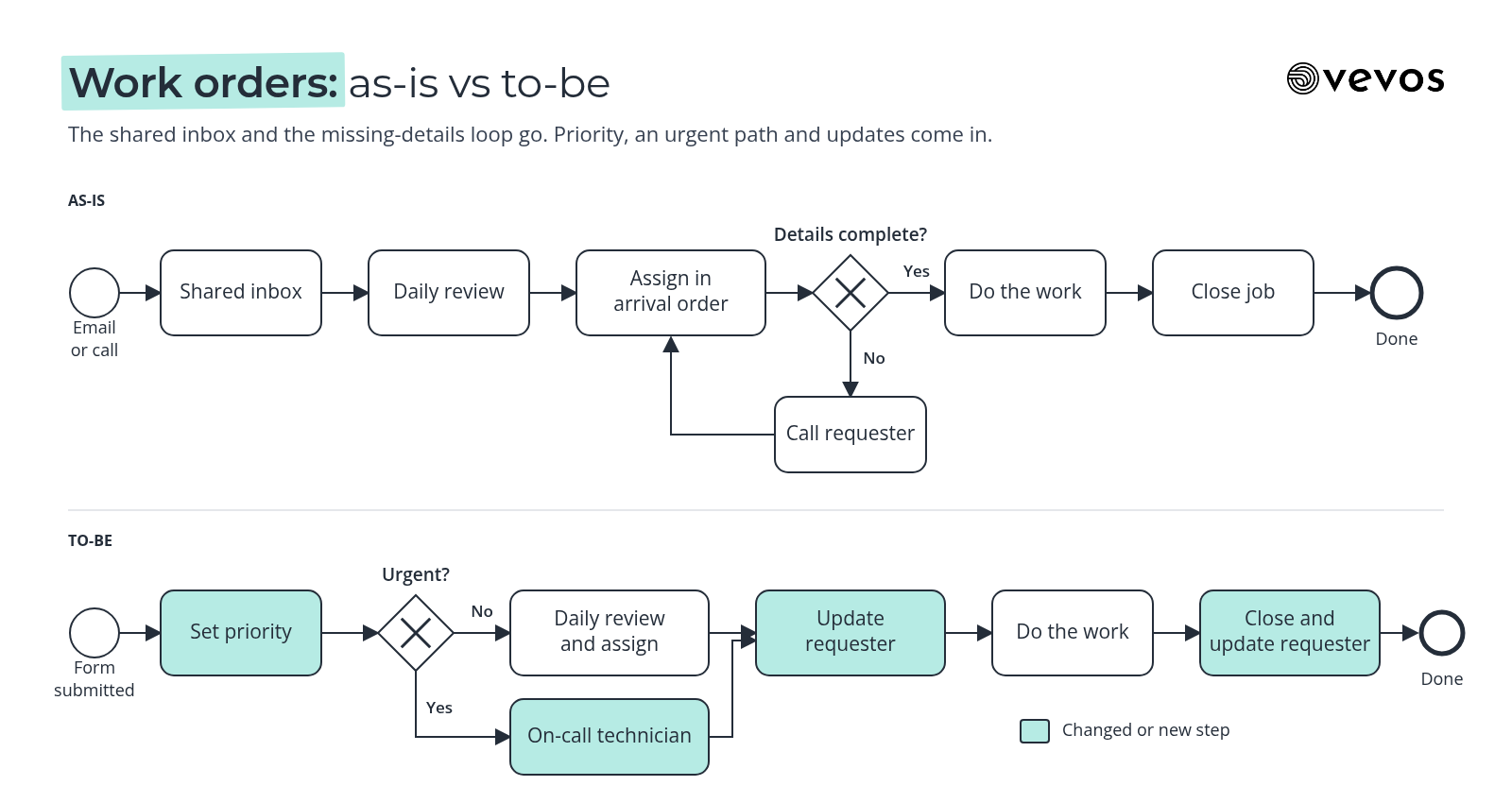
What changed. The shared inbox and the missing-details loop are gone. The priority decision and the urgent path are new. Owners are written on every step. For the full work order process, step by step, see our guide to the work order process.
How do you measure the change from as-is to to-be?
Compare cycle time, hand-offs, rework and exceptions before and after, using the as-is as your baseline. Cycle time shows whether work finishes sooner. Hand-offs show whether it moves more directly. Rework and exceptions show whether the new rules are working or creating new problems.
Cycle time: from request received to job closed. For urgent jobs, track it separately.
Hand-offs: how many times a job changes hands before it's done.
Rework: how often a job goes back for missing information or a repeat visit.
Exceptions: jobs that leave the to-be path, by reason.
Take the baseline from real cases before you switch over, even a few weeks' worth. Then measure the same way after. If a number gets worse, check the gap analysis: the risk you wrote down is often the cause.
Frequently asked questions
What does as-is mean in process mapping?
As-is means the current state of a process: how the work actually happens today, including hand-offs, waits, workarounds and exceptions. An as-is map is built from interviews, existing documents and real cases, not from the official policy. Its job is to show the problems clearly enough that the team can agree on what to change.
What is a to-be process?
A to-be process is the target future state: how the process should run after the changes you've agreed on. It usually removes waits and rework, gives each step and decision a clear owner, writes rules as explicit conditions and shows which steps will be automated. It should be realistic enough for the team to run.
Should you map the as-is process first?
Usually yes, but keep it brief. A quick as-is map shows where time goes and where work breaks, which keeps the to-be grounded in real problems. The exception is a brand new process with nothing to map yet, or a process you're replacing entirely. Even then, a rough sketch of today's workaround helps.
Can you use BPMN for both as-is and to-be maps?
Yes, and it's the easiest way to compare them. Using the same notation and the same level of detail for both maps means every step, decision and owner can be lined up side by side. BPMN gateways also make changed decision rules visible, which is often where the most important improvements sit.
How detailed should the as-is map be?
Detailed enough to find the problems, and no more. Capture the real steps, hand-offs, waits, rework loops and common exceptions, at the same level you'll use for the to-be. Don't spend weeks perfecting it. The as-is is a diagnostic tool for a process you're about to change, not a permanent record.
Map today, then decide tomorrow
Vevos is the AI Playbook for how companies run. Pick one process that frustrates people, map how it runs today with the people who do it, then design the to-be and list the gaps with owners. Today, Vevos can call a small set of outside tools through connectors your admin approves. Outside AI agents calling Vevos to run your processes are coming.
Describe your process in plain English and get a BPMN map, no account needed. You can start free on Intro. See current limits on the pricing page. Pulse is $9 a month, Rhythm is $29 a month for up to 4 users, and Tempo, where Conductor Agents build apps from the reviewed model, is $199 a month.
Related blog posts
- AI-Ready SOPs: How to Write Procedures That AI Can Follow — The machine-readable side of SOP writing: one action per step, conditions written as rules, exceptions as named paths, and a simple test to see whether an assistant can follow yours.
- Workflow Automation Software: How to Choose — A decision guide to the five kinds of workflow tools, the checks that matter before you buy, and how to tell whether you need a tool or a clearer process first.
- The AI Playbook: What It Is and How to Build One — A working record of your processes, owners, rules and exceptions that new hires and AI assistants can both use, with steps to build the first version.