The AI Playbook: What It Is and How to Build One
By Kirill Stolbushkin
An AI playbook is the documented, current record of how your company runs: its processes, owners, rules and exceptions, written so people and AI tools can both use it. It's not a strategy deck. It's the working answer to "how do we do this here?", kept up to date as the business changes.
Describe your process in plain English and get a BPMN map, no account needed.
What's an AI playbook?
In this post, an AI playbook is the shared, living record of how your company actually runs. Each important process is mapped, written up, owned by a named person and versioned. It's built so a new hire can follow it and an AI assistant can answer questions from it without guessing.
You'll also see "AI playbook" used for an AI adoption strategy: which models to buy, which use cases to fund, how to govern them. That's a useful document, but it's a different one. This post is about the record of how work gets done, which every AI strategy quietly depends on.
Most companies already have pieces of this. There's an onboarding doc from two years ago, a refund policy in a shared drive, a checklist pinned in a team channel, and a lot that lives in the heads of the people who've been there longest. The playbook pulls those pieces into one place, in one format, with one owner per process.
The "AI" part means two things. AI helps you build it, by drafting maps and docs from what you already have. And it's written clearly enough that AI tools can use it, because the rules, exceptions and owners are explicit rather than implied.
Why does a company need an AI playbook now?
AI tools only help with work that's written down correctly. Ask an assistant how your refunds work and it'll answer from whatever it can find, which may be an old policy or nothing. A current playbook gives people and tools the same, correct answer, and makes gaps visible before they cause mistakes.
It's not a new problem. Undocumented processes have always made onboarding slow, made handovers risky and made it hard to change anything without breaking something. What's changed is that more of the work now passes through tools that need explicit instructions. A person can fill a gap with judgment or a quick question. A tool can't, or it fills it with a guess.
There's also a governance angle. If you're using AI tools on real work, you need to know which rules they're following and who's accountable for those rules. NIST's AI Risk Management Framework, a voluntary framework for managing AI risk, is a good reference for that side. A playbook doesn't replace that kind of governance, but it gives it something concrete to point at.
And it's useful even if you never point an AI tool at it. A process that's mapped, owned and current is easier to train on, easier to improve and easier to hand over.
What goes into an AI playbook?
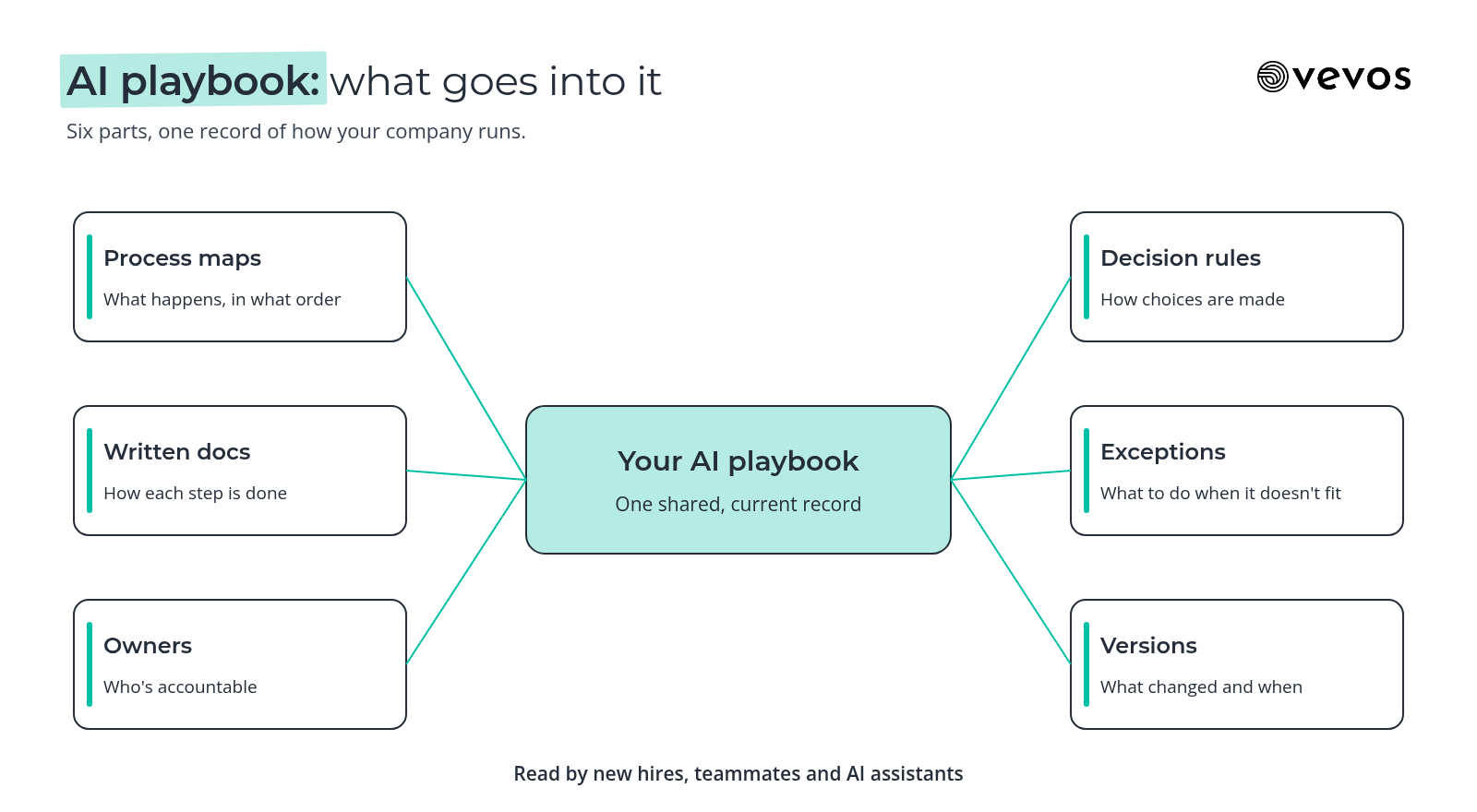
Six things: a process map for each important process, written documentation, a named owner, the decision rules, the exceptions and their paths, and a version history. Together they answer what happens, who does it, how decisions are made, what to do when something's off, and what changed recently.
Part | What it answers | Good enough looks like |
|---|---|---|
Process map | What happens, in what order | A BPMN map with clear start, end and decisions |
Written docs | How each step is done | Plain steps a new hire can follow |
Owner | Who's accountable | One named person per process |
Decision rules | How choices are made | Thresholds and conditions written out, not "use judgment" |
Exceptions | What to do when it doesn't fit | Each common exception has a path and an owner |
Versions | What changed and when | Every change saved, with the previous version kept |
The map and the docs do different jobs. The map shows the shape of the process, so you can see hand-offs and decisions at a glance. The docs carry the detail a person needs at each step. Keep them together, so a change to one prompts a change to the other.
How do you build an AI playbook, step by step?
Start small: pick three to five processes that matter, capture them from what you already have, review them with the people who do the work, name an owner for each and publish them where everyone can find them. Then add processes one at a time. A small, current playbook beats a big, stale one.
Pick three to five processes. Choose ones that run often, cause repeat questions or are about to change. Customer refunds, employee onboarding and purchase requests are common first picks.
Capture them from what exists. Start from the SOPs, policies, checklists and walkthrough recordings you already have. Don't start from a blank page if you don't have to.
Review with the doers. Walk each map with the people who do the work. They'll find the exceptions and workarounds the policy doesn't mention.
Name an owner. One person per process, responsible for keeping it accurate and deciding when the rules change.
Publish it. Put it where people already look, and make it the answer you point to when someone asks how something works.
This is the part Vevos is built for: it generates a BPMN map and written docs from a description or an existing document, keeps version history with a visual diff so you can see what changed, and exports to the formats your team already uses.
If you're still deciding who should own what, our guide to process ownership and RACI covers how to assign it without creating a committee.
How do you keep the AI playbook current?
Tie updates to real changes, not a calendar. When a policy, system, team or threshold changes, the owner updates the map and docs, and the old version is kept. Give each process a review date as a backstop. A playbook nobody trusts is worse than none, because people stop checking it.
Good change triggers:
A policy or approval threshold changes.
A team, role or system involved in the process changes.
The same question gets asked twice and the playbook didn't answer it.
An exception happens that isn't on the map.
Version history matters more than it sounds. When someone asks "since when do we do it this way?", the answer should be one click away, with the previous version still readable. It also makes reviews faster, because the owner only checks what changed.
We wrote a longer guide on keeping process documentation up to date, including how to assign review dates without turning them into busywork.
How will AI agents use an AI playbook?
Today, people and AI assistants can read a playbook and answer questions from it: what's the refund limit, who approves this, what happens if the invoice doesn't match. Outside AI agents calling Vevos to follow your playbook directly are coming. Until then, treat the playbook as the source both people and assistants read from.
That distinction matters. An assistant answering a question from your documented rules is low risk, because a person still acts on the answer. An agent acting on the rules by itself needs the rules to be complete and current, and needs clear points where a person reviews or approves.
So build for the second case now, even if you're only using the first. Write rules as rules, not as hints. Name the exceptions. Mark the steps where a person must decide. A playbook that's ready for agents is also simply a better playbook for people.
What changes by team size?
A 10-person startup needs a short playbook covering the few processes that cause the most questions, owned by whoever runs operations. A 300-person company needs the same structure across many teams: consistent formats, one owner per process, clear review triggers and a single place everyone treats as current.
At 10 people. The founder probably knows most processes. The risk is that only the founder knows them. Write down the three to five processes new hires ask about most, keep each to a single map and a page of notes, and update them when they change. That's enough.
At 300 people. The risk is inconsistency. Five teams document five ways, and nobody's sure which version is current. Agree on one format, map processes the same way, give every process an owner and make the playbook the place people go first. Compliance teams will thank you, but that's a side benefit, not the reason to do it.
In between, the work is mostly the same. Add processes one at a time, keep owners named, and retire anything nobody uses.
What does an AI playbook look like for customer service refunds?
Take refunds in a customer service team. The playbook entry has a map of the refund process, the rules for who can approve what, the exceptions, and an owner. Then someone asks, "What can I refund without a lead?" and gets the same correct answer every time, from a person or an assistant reading the playbook.
The map. A refund request comes in. The rep checks the order and the reason. A decision splits by amount and reason: within the rep's limit, outside it, or a case that needs a lead regardless of amount. Each branch ends with the refund issued, declined or escalated.
The rules. The team writes the limits out. For example: reps can refund up to a set amount for a damaged or late order, a lead approves anything above it, and any repeat refund to the same customer in a set period goes to a lead. The company sets the numbers. The playbook just makes them explicit.
The exceptions. Orders paid with a gift card, partial refunds on bundles and requests outside the return window. Each one gets a path and an owner, so nobody has to improvise.
The question. "What can I refund without a lead?" The answer comes straight from the written rules: the amount, the reasons that qualify and the cases that always go to a lead. A new hire gets it on day one. An assistant reading the playbook gives the same answer. When the limit changes, the owner updates the rule once and every answer changes with it.
For the wider set of support processes worth documenting, see our guide to customer service processes.
How do you measure an AI playbook's value?
Watch three things: fewer repeat questions to the people who used to be the only source of answers, faster onboarding for new hires, and owners who are still current. You don't need precise numbers on day one. A simple before and after on each is enough to see whether people use it.
Repeat questions. Ask the people who get asked the most to note how often they answer the same question. If the playbook works, that drops.
Onboarding time. Track how long it takes a new hire to handle a process on their own. Compare hires before and after the playbook.
Current owners. Check every quarter that each process still has an owner who's in the role. An orphaned process is the first sign the playbook is going stale.
Freshness. Look at when each process was last reviewed or changed. Old dates on busy processes mean something has drifted.
None of this needs a dashboard to start. A short list and a monthly check is enough.
Frequently asked questions
Is an AI playbook the same as an AI strategy?
No. An AI strategy decides which AI tools to adopt, which use cases to fund and how to govern them. An AI playbook, as we use the term, is the documented record of how your company runs, with processes, owners, rules and exceptions. The strategy depends on the playbook, because AI tools need accurate instructions to be useful.
What tools do you need to build an AI playbook?
You need a place to keep process maps, written documentation and version history together, with a named owner on each process. That can start as simply as shared documents and diagrams. A dedicated tool helps once you have more than a handful of processes, because keeping maps, docs and versions in step by hand gets slow.
Can AI agents follow my AI playbook today?
AI assistants can read a clear playbook and answer questions from it today, while a person still acts on the answer. Outside AI agents calling Vevos to follow your playbook directly are coming. Until then, write the rules and exceptions explicitly and mark where a person must decide, so the playbook is ready when they are.
How many processes should I start with?
Start with three to five. Pick processes that run often, cause repeat questions or are about to change. That's enough to show value and small enough to keep current. Add more one at a time once the first few have owners and have survived at least one real change without going stale.
Who owns the AI playbook?
Each process has one named owner who keeps it accurate and decides when its rules change. Someone in operations usually looks after the playbook as a whole: the format, the review dates and making sure no process is left without an owner. Ownership by committee tends to mean nobody updates anything.
How companies run, written down
Vevos is the AI Playbook for how companies run. Start with the few processes people ask about most, write them down, review them with the people who do the work and give each an owner. Today, Vevos can call a small set of outside tools through connectors your admin approves. Outside AI agents calling Vevos to follow your processes are coming.
If you're also thinking about automation at enterprise scale, our post on what hyperautomation means covers the tooling side. This post stays with the record underneath it.
Describe your process in plain English and get a BPMN map, no account needed. You can start free on Intro. See current limits on the pricing page. Pulse is $9 a month, Rhythm is $29 a month for up to 4 users, and Tempo, where Conductor Agents build apps from the reviewed model, is $199 a month.
Related blog posts
- As-Is vs To-Be Process Mapping: How to Map Today and Tomorrow — How to capture the process you really run, design the one you want, and turn the difference into a short gap list with owners, using a facilities work order process as the example.
- AI-Ready SOPs: How to Write Procedures That AI Can Follow — The machine-readable side of SOP writing: one action per step, conditions written as rules, exceptions as named paths, and a simple test to see whether an assistant can follow yours.
- Workflow Automation Software: How to Choose — A decision guide to the five kinds of workflow tools, the checks that matter before you buy, and how to tell whether you need a tool or a clearer process first.