Intelligent Document Processing: Where It Fits in Your Process
By Kirill Stolbushkin
Intelligent document processing (IDP) is software that reads documents such as invoices, forms and claims, classifies them and extracts the data into fields other systems can use. It's one step in a longer process. Intake, validation, exception review and approval decide whether the extracted data does any good.
Describe your process in plain English and get a BPMN map, no account needed.
What's intelligent document processing (IDP)?
IDP is software that turns documents built for people into data built for systems. It takes in files in different formats and layouts, works out what kind of document each one is, pulls out the fields you care about and checks them, then hands the result to the next step of your process.
Gartner's market definition describes IDP solutions as specialized tools that automate the extraction of data from documents in many formats and layouts, and pass that data to the applications and workflows that depend on it. Their list of core features goes further: ingestion, classification, extraction, human review and correction of extracted data, and orchestration around it.
That last part is easy to skip past. Even the market definition assumes a person checks some of the output, and that the extracted data feeds a workflow. IDP doesn't stand alone. It sits inside a process that someone has to design.
The documents vary a lot. Some are structured, like a standard form. Some are semi-structured, like invoices, which have the same fields in different places. Some are unstructured, like an email describing a claim. The less structured the document, the more the steps around extraction matter.
How is IDP different from OCR and RPA?
OCR turns pixels into text. IDP adds classification, field extraction and validation, so the output is usable data rather than a page of text. RPA clicks through screens to move data between applications. A document process often uses all three, but each one solves a different problem.
OCR | IDP | RPA | |
|---|---|---|---|
What it does | Converts an image of text into text | Classifies documents, extracts fields, checks them | Repeats clicks and keystrokes in applications |
Output | Raw text | Named fields with values, ready to use | Actions taken in another system |
Handles layout changes | Reads text wherever it is, without meaning | Built for varied layouts | Breaks when screens change |
Needs a person for | Everything after the text | Low-confidence fields and exceptions | Cases outside the script |
Typical role | One part inside IDP | The reading step of a document process | Moving the result into older systems |
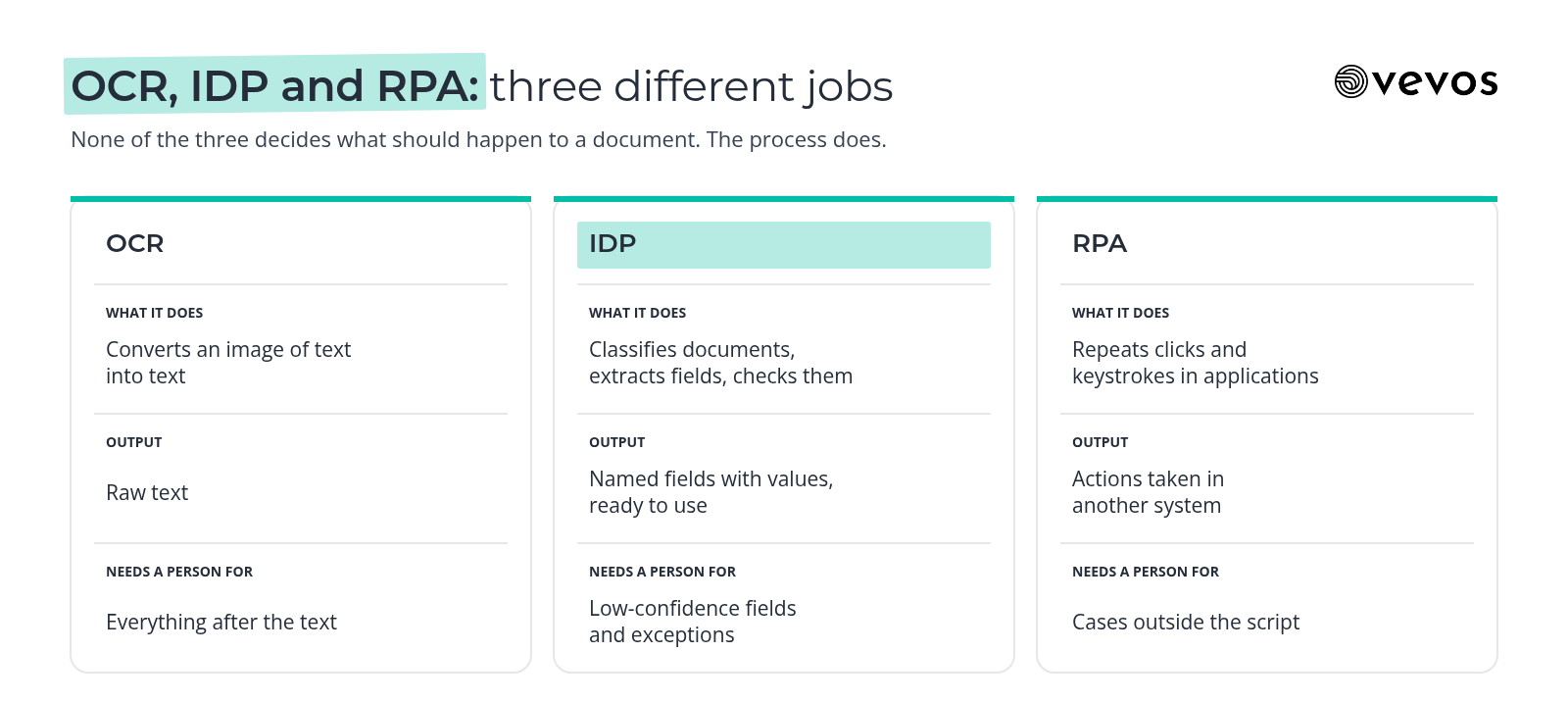
If you want the longer comparison of RPA with agent-style automation, our post on agentic process automation vs RPA covers it. For this post, the key point is that none of the three decides what should happen to a document. The process does.
Where does IDP fit in a document workflow?
Extraction is one step out of eight: intake, classify, extract, validate, review exceptions, approve, route and post. Most of the work and most of the risk sit outside extraction, in the checks, the exception handling and the approvals. Map the whole flow before you judge any tool by its extraction alone.
Intake. Documents arrive by email, upload, scan or portal. Someone has to decide which channels count and what happens to a document that arrives the wrong way.
Classify. Is this an invoice, a credit note, a statement or a duplicate? Wrong classification sends the document down the wrong path.
Extract. The IDP step. Fields like supplier, date, amount and line items are pulled out.
Validate. The extracted data is checked against something you trust: a purchase order, a supplier record, a policy.
Review exceptions. Anything that fails validation, or that the tool wasn't confident about, goes to a person.
Approve. The right person approves, based on amount, cost center or document type.
Route. The approved data goes where it's needed next.
Post. The record is created in the system of record, and the document is filed.
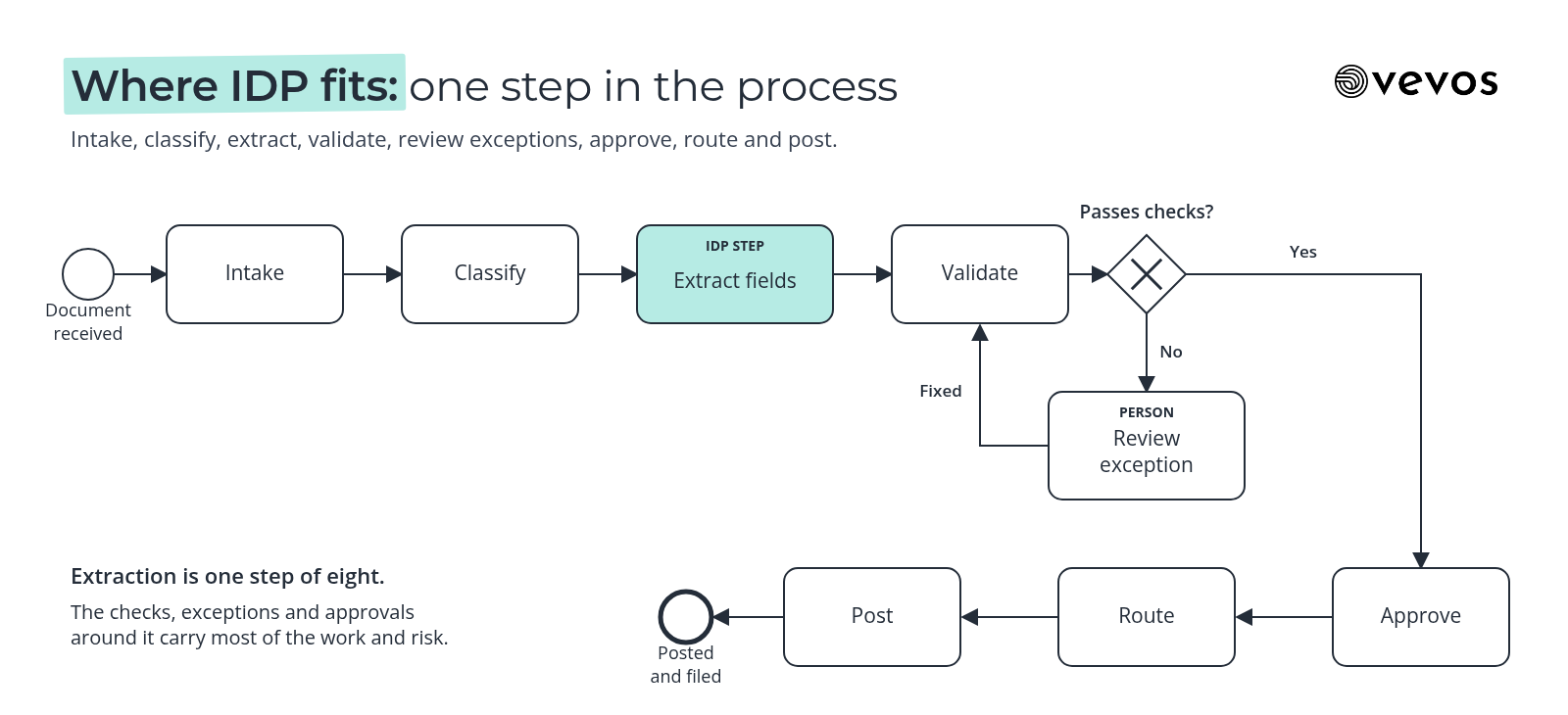
Look at where the decisions are. Classification, validation, exception review and approval all involve rules or judgment. Extraction is the one step a tool can do well on its own, and it's the one step most product pages talk about.
Which document processes should you automate first?
Start with documents that arrive often, follow recognizable layouts and feed a process with clear rules. Supplier invoices, supplier onboarding forms, new-hire paperwork and insurance claim intake are common starting points. The right first pick is the one where you can already name the exceptions and the owner.
Process | Documents | Typical exceptions | Usual owner |
|---|---|---|---|
Supplier invoice intake | Invoices, credit notes | No matching PO, amount differs, duplicate | Accounts payable |
Supplier onboarding | Registration forms, tax forms, bank details | Missing fields, changed payment details | Procurement or AP |
New-hire paperwork | Offer letters, tax and ID forms | Missing signature, expired document | HR operations |
Insurance claim intake | Claim forms, photos, supporting letters | Missing evidence, policy doesn't cover the event | Claims intake team |
For each candidate, ask whether the validation rules are written down. If the team checks invoices against POs "when it looks off", that rule needs writing out before any tool can apply it. Payment detail changes deserve a person every time, whatever the tool says.
Why do IDP projects stall after the pilot?
Extraction accuracy is rarely what stops them. Pilots stall because the exceptions were never documented, nobody owns the review queue, or the approval rules lived in someone's head. The tool reads documents well enough, then the extracted data lands in a process nobody defined, and people go back to doing it by hand.
A pilot usually runs on a clean sample. Production brings the awkward cases: the supplier who sends three invoices in one PDF, the form with a handwritten correction, the claim with a missing page. If those cases have no path, they pile up in a queue with no owner.
Three fixes, all on the process side:
Write the exceptions down. List the cases that don't fit, and decide what happens to each.
Name the queue owner. Someone has to clear the review queue every day, with authority to decide.
Make the rules explicit. Validation and approval rules need conditions and thresholds, not "use judgment".
None of these needs a better extraction model. They need a mapped, owned process.
How do you map the process around IDP before you buy a tool?
Gather what you already have: the SOP, a handful of real sample documents and a recording of someone working through them. Turn those into a process map, then mark exactly where extraction, validation and human review happen. Then you can judge tools by how they fit your process, not by a demo.
Collect the SOP and policies. Even an outdated one is a useful starting point.
Pull real samples. Include the awkward ones, not just clean examples.
Record a walkthrough. Watch someone process five documents and talk through each decision.
Draft the map. Intake to posting, with every decision as a gateway and every exception as a path.
Mark the IDP step. Show exactly which fields extraction must produce and what validation checks them against.
Review with the team. The people doing the work will correct the map faster than anyone else.
Vevos turns those existing documents into a BPMN map plus written documentation, and your team reviews it before anything is built. If your starting point is a PDF of an existing procedure, our guide to converting process PDFs into BPMN walks through it.
What changes by team size?
A small finance team may only need a clear exception path and one reviewer who clears it daily. A larger or multi-site team needs owners for each step, the same validation rules everywhere and a shared map, so one site's workaround doesn't quietly become another site's process.
Small teams. Keep the map short. One intake channel, one reviewer, written validation rules and a daily habit of clearing the queue. You don't need a large platform to get value from extraction if the steps around it are clear.
Larger teams. The challenge is consistency. Different sites receive different documents, apply slightly different checks and escalate to different people. Agree on one map, one set of validation rules and named owners per step. Then roll out extraction site by site, measuring each against the same baseline.
What does IDP look like for supplier invoice intake at a services firm?
Take supplier invoices at a professional services firm. Invoices arrive by email, extraction is done by the IDP or OCR tool the team picks, the extracted fields are checked against the PO, exceptions go to a queue and approved invoices move on for payment. The map shows where each step sits and who owns it.
Intake. Suppliers email invoices to one AP address. Anything sent elsewhere is forwarded there, so there's one entry point.
Extraction. The chosen tool pulls the supplier, invoice number, date, amount and PO number. Low-confidence fields are flagged rather than guessed.
Validation. A rule checks the invoice against the PO: does the PO exist, is the supplier the same, is the amount within the agreed tolerance? It also checks for duplicates by supplier and invoice number.
Exception queue. No PO, an amount outside tolerance, a possible duplicate or a flagged field goes to an AP reviewer, who fixes it, rejects it or routes it to the budget holder.
Approval. Invoices that pass validation go to the budget holder for approval, with a second approver above a set amount. The firm sets the limits.
How do you measure an IDP rollout?
Track straight-through rate, exception rate, touch time per document and cycle time from receipt to posting. Measure each against the baseline you recorded when you mapped the process. These show whether extraction is helping the whole process, not just whether the tool reads fields correctly in a demo.
Straight-through rate: the share of documents that go from intake to posting with no human touch.
Exception rate: the share that land in the review queue, broken down by reason. The reasons tell you whether to fix the tool, the rules or the supplier's documents.
Touch time per document: the minutes people actually spend, including exception handling.
Cycle time: from receipt to posting. This is the number suppliers and budget holders notice.
Record the baseline before you switch anything on, even if it's a week of sampled documents. Then compare after, by exception reason as well as in total.
Frequently asked questions
What's the difference between OCR and intelligent document processing?
OCR converts an image of text into machine-readable text, but it doesn't know what the text means. Intelligent document processing also classifies the document, extracts specific named fields and checks them, so the output is data a process can use. OCR is often one component inside an IDP tool rather than a separate choice.
Is IDP the same as RPA?
No. RPA automates clicks and keystrokes in applications, following a script. IDP reads documents and turns them into structured data. They're often combined in one process: IDP reads the invoice, and RPA or another automation enters the result into an older system that has no other way in. Neither one decides the process rules.
Which documents are best suited to IDP?
High-volume, semi-structured documents are the best fit: invoices, credit notes, application forms, onboarding paperwork and claim forms. They share the same fields in varying layouts, which is what IDP is built for. One-off contracts and free-form letters can work too, but they usually need more human review of the output.
Do I need a process map before buying an IDP tool?
It's strongly recommended. A map shows exactly where extraction sits, which fields it must produce, what validates them and which exceptions need people. Without it, you'll judge tools on demo accuracy and find the real problems after rollout, when unowned exceptions start piling up in a queue nobody planned for.
Does Vevos do OCR or document extraction?
No. Vevos doesn't have a native OCR or IDP feature. It maps and documents the process around your documents in BPMN, and on Tempo and above, Conductor Agents can build and deploy an app from the reviewed model. Extraction comes from the tool or model you choose, which the app calls as one step.
Map the process, then pick the reader
Vevos is the AI Playbook for how companies run. Before you choose an IDP tool, map the full document process, write down the exceptions and name the owners. Today, Vevos can call a small set of outside tools through connectors your admin approves. Outside AI agents calling Vevos to run your processes are coming.
Describe your process in plain English and get a BPMN map, no account needed. You can start free on Intro. See current limits on the pricing page. Pulse is $9 a month, Rhythm is $29 a month for up to 4 users, and Tempo, where Conductor Agents build apps, is $199 a month.
Related blog posts
- AP Automation Software: What to Look For — A buyer's checklist for accounts payable tools, with 3-way matching explained, the features worth testing, the AP rules to write down first and a manufacturing example.
- What Is AI Business Process Automation? — A plain guide to putting AI inside a whole business process: where it beats rules and bots, how to score your first candidate, and a purchase request example from map to app.
- 12 Small Business Processes You're Still Doing by Hand (And Shouldn't Be) — The reason you still do these by hand isn't laziness. It's that every tool made you choose between a flowchart and a developer. Here are the 12.