What Is AI Business Process Automation?
By Kirill Stolbushkin
AI business process automation is the use of AI to carry out or assist the steps of a whole business process, not just one task. It reads, classifies and drafts where judgment is needed, while rules handle routing and people keep the approvals and exceptions. It works best on a process that's already mapped and owned.
Describe your process in plain English and get a BPMN map, no account needed.
How does AI business process automation work?
It's automation that covers a process from trigger to outcome, with AI doing the steps that used to need a person to read or decide. A rule moves a request to the right approver. AI reads the attached quote, pulls the amount and supplier, and flags what looks wrong. People still own the decisions that carry risk.
The difference from older automation is scope. Single-task automation fixes one step: a form that fills a spreadsheet, a reminder email, a bot that copies a field. Those help, but the process around them stays the same, with the same hand-offs and the same places where work waits for someone.
A business process has a trigger, a series of steps, more than one person, at least one decision and a clear end. Purchase requests, client onboarding, invoice approval, employee offboarding. Business process automation in the general sense is the technology-enabled automation of processes like these (Wikipedia's overview is a reasonable background read). Adding AI changes which steps can be automated. Steps that involve unstructured input, like an email, a PDF or a scanned form, used to be manual because rules can't read them. AI can.
That doesn't mean AI should run the whole thing. The useful version puts AI where judgment is cheap and reversible, and keeps people where it's expensive or final.
How is it different from RPA and workflow automation?
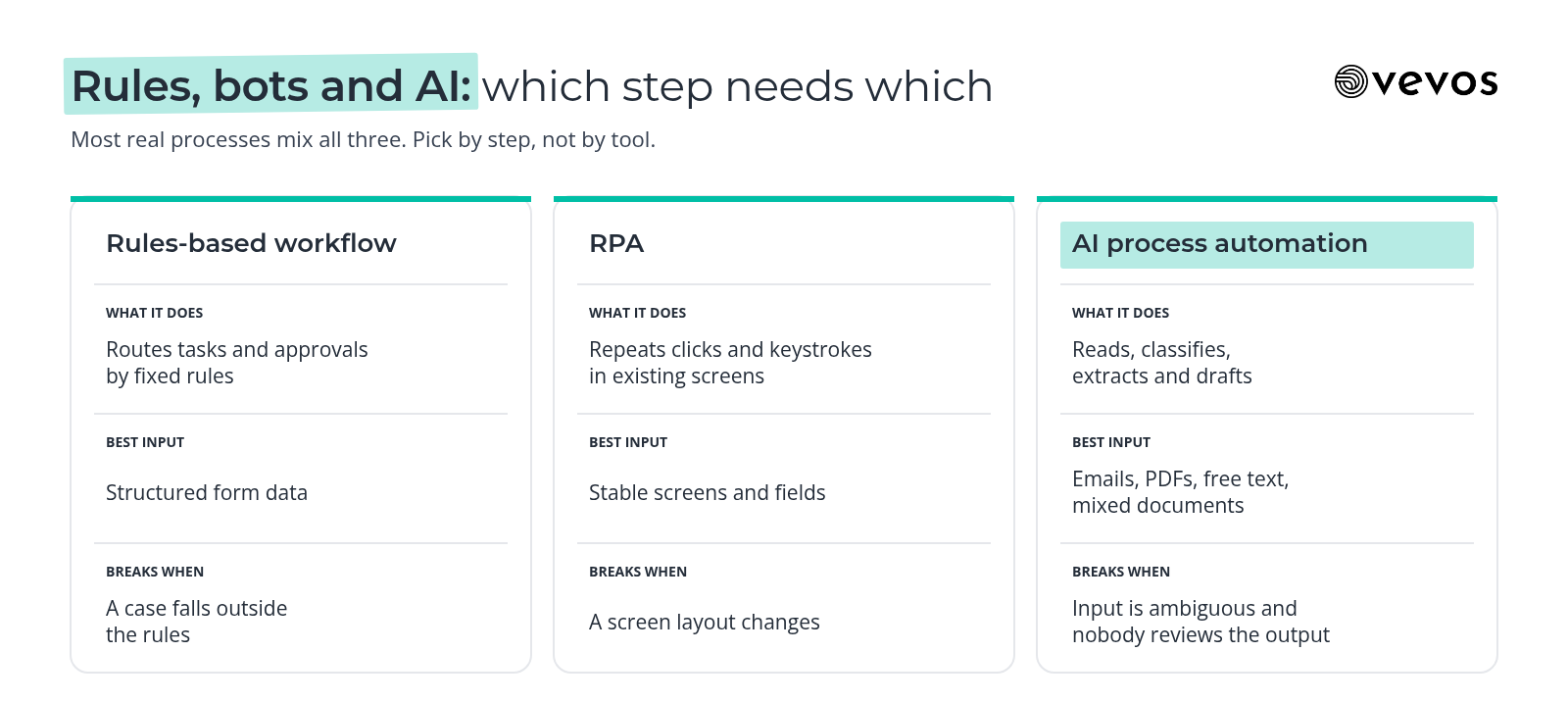
Workflow tools route tasks by fixed rules. RPA repeats screen actions a person would take, like copying values between systems. AI handles judgment steps: reading a document, classifying a request, drafting a reply. Real processes usually mix all three, so the question is which step needs which kind of automation, not which tool wins overall.
Rules-based workflow | RPA | AI process automation | |
|---|---|---|---|
What it does | Routes tasks and approvals by fixed rules | Repeats clicks and keystrokes in existing screens | Reads, classifies, extracts and drafts |
Best input | Structured form data | Stable screens and fields | Emails, PDFs, free text, mixed documents |
Breaks when | A case falls outside the rules | A screen layout changes | Input is ambiguous and nobody reviews the output |
Needs from you | Clear rules and owners | Stable systems | Clear rules, review points and examples |
Good fit | Approvals, hand-offs, reminders | Legacy systems with no other way in | Intake, triage, document-heavy steps |
If you want the longer version of where agent-style automation fits against RPA, we covered it in agentic process automation vs RPA. The short version for this post: rules are predictable, bots are brittle, and AI is flexible but needs a person checking the cases where flexibility can go wrong.
Which business processes should you automate with AI first?
Pick a process that runs often, is already written down somewhere, has exceptions you can name and has one clear owner. Frequency gives you a return. Documentation gives you a starting map. Known exceptions tell you where people stay in the loop. One owner means someone can decide when the rules change.
Score each candidate on the five questions below. Use a simple 0, 1 or 2 per row rather than inventing hours or dollar figures you don't have yet. The process with the highest total is usually the right first project, as long as it scores at least 1 on ownership.
Question | 0 | 1 | 2 |
|---|---|---|---|
How often does it run? | A few times a quarter | Weekly | Daily or more |
Is it documented? | Only in someone's head | Partly, in old notes or a checklist | Written and roughly current |
Are the exceptions known? | Every case is different | Some are known | The common ones are listed |
Is there one owner? | Nobody, or a committee | Shared between two people | One named person |
Does it involve reading or sorting input? | No | Sometimes | Most cases |
The last row matters because it's where AI adds something rules can't. A process that's frequent and well owned but fully structured may only need a rules-based workflow. That's fine. Not every process needs AI, and the best automation is often the plainest one that works.
Things to avoid for a first project: processes that touch payments or legal commitments with no human check, processes that change every month, and processes where three teams disagree about who owns the outcome. Fix the ownership first. Invoice approval is a common candidate, and our guide to the invoice approval workflow covers how to design and automate AP approvals.
Why does the process map come before the automation?
Automating an undocumented process automates its gaps. If nobody wrote down what happens when a request is over budget, the automation will either ignore that case or guess. A reviewed process map shows the approval rules, exceptions and hand-offs that the automation must respect, before anyone builds anything.
Most processes that feel simple aren't. Ask three people how a purchase request works and you'll get three answers, each correct for the cases that person sees. The map is where those answers meet. It turns "it depends" into named decisions with named outcomes.
BPMN is useful here because it's a standard. Gateways make decisions explicit. Lanes show who owns each step. Events show what starts and ends the process. When you later point an AI step or a build tool at that model, there's less to interpret.
The map also gives you the baseline you'll measure against. Without it, you can't say whether the automation made the process faster, or just moved the waiting somewhere else.
A practical rule: review the map with the people who do the work before you automate any of it. They will find the exception paths that the process owner forgot.
How do you go from a process map to a working app?
Capture the process, review the map, build from the reviewed model, then test with real cases. Capture can start from a plain description or an existing document. Review is where the owner and the people doing the work correct it. Build and test come only after the model reflects how the work should run.
Capture. Describe the process in plain language, or start from an SOP or policy document you already have. The goal is a first BPMN draft, not a perfect one.
Review. Walk the map with the process owner and at least one person who does the work. Fix the decisions, add the exception paths and confirm who owns each step.
Build. Turn the reviewed model into an app with forms, routing and the AI-assisted steps you chose. Keep human review on approvals and anything final.
Test. Run real past cases through it, including the awkward ones. Compare the result with what actually happened.
This is the part we built Vevos for: it generates a BPMN map and process docs from a description or document, your team reviews and versions the model, and on Tempo and above, Conductor Agents build and deploy an app from the reviewed model. For the longer walkthrough, see how a reviewed BPMN model becomes a working app.
What does this look like for a small team vs a larger one?
Small teams should start with one process and one owner, and keep the map simple enough to change in an afternoon. Larger teams need the same discipline at more scale: consistent modeling across teams, named owners for every process and a shared place where the current version lives.
Small teams. The founder or an operations lead usually knows the process best. Write it down once, review it with the one or two people who do it, and automate the most annoying step first. Resist building for cases you haven't seen yet. When the process changes, update the map before you update the app.
Larger teams. The risk isn't the first automation. It's the tenth, built by a different group with a different idea of what "approved" means. Agree on how processes are modeled, who owns each one and how changes get reviewed. A shared library of reviewed models, versioned so you can see what changed, does more for consistency than any single tool choice.
In both cases, keep the human checks proportionate. A low-value internal request doesn't need the same review as a contract commitment.
What does AI process automation look like for a purchase request at a services firm?
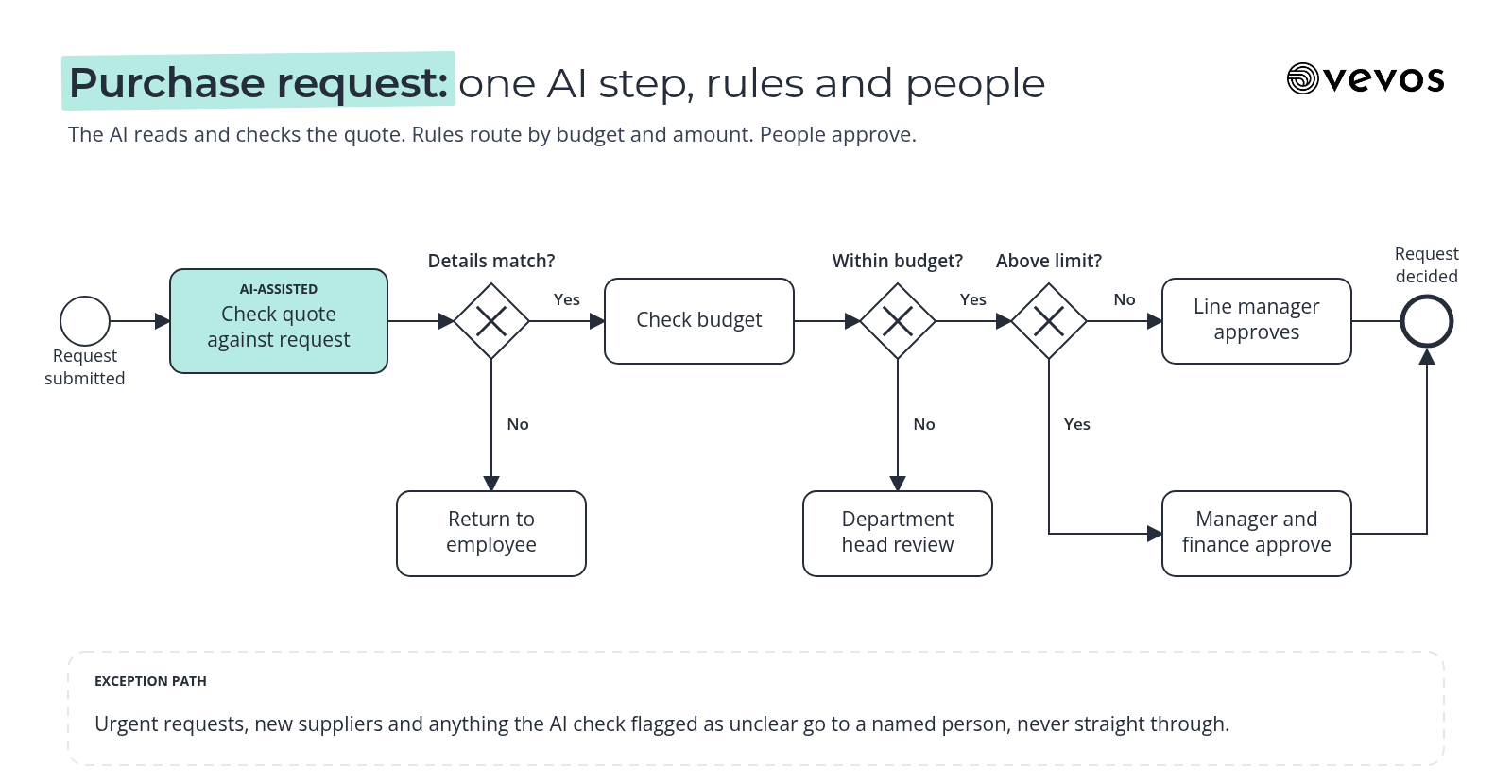
Take a purchase request at a professional services firm. Someone needs software or equipment, the request needs a budget check, approval depends on the amount, and some requests come in without the right details. Map that first, mark the one step AI should assist, then build an app that covers the routine path.
The trigger. An employee submits a request with a description, an amount, a supplier and usually a quote attached as a PDF.
The AI-assisted step. AI reads the quote, extracts the supplier, amount and line items, and compares them with what the employee typed. If they don't match, or the quote is missing, it flags the request back to the employee with a short note. This is a reading and checking step, the kind rules can't do on their own.
The budget check. A rule checks the amount against the department's remaining budget. Within budget goes forward. Over budget goes to the department head with the gap shown.
Approval thresholds. A gateway routes by amount. Below a set limit, the line manager approves. Above it, finance approves as well. The firm sets the limits. The map just makes them explicit.
The exception path. Urgent requests, new suppliers and anything the AI step flagged as unclear go to a person. Nobody should be surprised by an exception, because each one has a named path and owner on the map.
What the built app covers. A request form, the document check, budget and threshold routing, approver tasks with the extracted details shown, and the exception queue. What it leaves to people: the approvals themselves and anything flagged. Everything else waits until the routine path works.
How do you measure AI process automation?
Measure cycle time, touch time, exception rate and rework, each against the baseline you recorded when you mapped the process. Cycle time shows whether the process got faster. Touch time shows how much human effort it still takes. Exception rate and rework show whether the AI steps are helping or creating cleanup work.
Cycle time: from trigger to outcome. In the example, from request submitted to request approved or rejected.
Touch time: the minutes people actually spend on a case, as opposed to the hours it waits.
Exception rate: the share of cases that leave the main path. A sudden rise usually means the rules or the AI step need attention.
Rework: cases sent back because something was wrong. If the AI step catches mismatches early, rework later in the process should drop.
Record the baseline before you build, even roughly. A week of sampled cases is better than a guess. For turning these measures into a business case, see calculating the ROI of process automation.
On the human side, keep people accountable for AI-assisted decisions and review a sample of AI outputs regularly. If you need a structure for that, NIST's AI Risk Management Framework is a voluntary framework for managing AI risk, and a sensible place to start.
Frequently asked questions
Is AI business process automation the same as RPA?
No. RPA mimics the clicks and keystrokes a person makes in existing screens, so it works best on stable, structured tasks. AI business process automation handles judgment steps, like reading a document or classifying a request, inside a defined process. Many processes use both, with rules for routing, RPA for old systems and AI for unstructured input.
Do I need BPMN to automate a process with AI?
Not strictly. You can automate from a checklist or a description. But a standard map like BPMN makes the rules, decisions and exceptions explicit, which is exactly what an automation needs to respect. It also gives reviewers one shared picture to correct, so you catch the missing cases before they reach a built app.
What's the first process to automate?
Choose a frequent, rule-heavy process with one clear owner and exceptions you can name. Purchase requests, client onboarding and invoice intake are common starting points. Avoid processes that change every month, have no owner or touch payments without a human check. Score your candidates on frequency, documentation, exceptions, ownership and how much reading they involve.
Can AI automate a whole process end to end?
Some processes, mostly yes, for the routine path. But keep human review on exceptions, approvals and anything that commits money or carries legal weight. The practical goal is to automate the reading, sorting and routing so people spend their time on the decisions that matter, not to remove people from the process entirely.
How much does it cost to start?
You can start free on Intro. See current limits on the pricing page. The free generator turns a typed description into a BPMN map with no account. Pulse is $9 a month, Rhythm is $29 a month for up to 4 users, and Tempo, where Conductor Agents build apps, is $199 a month.
Start with the map
Vevos is the AI Playbook for how companies run. Pick one process, write it down, review it with the people who do the work, and only then decide which steps AI should take on. Today, Vevos can call a small set of outside tools through connectors your admin approves. Outside AI agents calling Vevos to run your processes are coming. A reviewed map is useful now without them.
Describe your process in plain English and get a BPMN map, no account needed. When you're ready to build, compare plans on the pricing page.
Related blog posts
- AP Automation Software: What to Look For — A buyer's checklist for accounts payable tools, with 3-way matching explained, the features worth testing, the AP rules to write down first and a manufacturing example.
- Intelligent Document Processing: Where It Fits in Your Process — Extraction is one step. This guide covers the intake, validation, exception review and approval around it, which documents to start with, and why IDP projects stall after the pilot.
- 12 Small Business Processes You're Still Doing by Hand (And Shouldn't Be) — The reason you still do these by hand isn't laziness. It's that every tool made you choose between a flowchart and a developer. Here are the 12.