AP Automation Software: What to Look For
By Kirill Stolbushkin
AP automation software is software that takes in supplier invoices, matches them to purchase orders and receipts, routes them for approval and schedules payment. To choose one, test it against your own AP rules: your approval thresholds, matching tolerances and exception types. A tool that fits your rules beats one with the longest feature list.
Describe your process in plain English and get a BPMN map, no account needed.
What is AP automation software?
It's software that handles the repeatable parts of accounts payable: getting invoices in, reading the details, matching them to what was ordered and received, sending them to the right approver and lining them up for payment. People stay on the exceptions, the approvals that carry risk and any change to supplier payment details.
Accounts payable is the money a business owes its suppliers, and the AP team's job is making sure every invoice is approved, recorded and paid correctly. Wikipedia's accounts payable entry is a reasonable background read on the basics and on the controls AP teams usually keep.
A typical AP flow runs: invoice received, data captured, matched against the PO and receipt, exceptions resolved, approved, scheduled for payment and recorded in the books. AP automation software can cover most of that, but the rules it applies come from you. That's why the buying decision starts with your process, not the vendor's demo.
What does 3-way matching mean in AP?
Three-way matching checks that the supplier invoice, the purchase order and the goods receipt agree before an invoice is paid. If the quantities and prices line up within the tolerance you set, the invoice moves on. If they don't, it becomes an exception for a person to resolve.
The three documents answer three questions:
Purchase order: what did we agree to buy, and at what price?
Goods receipt: what actually arrived?
Invoice: what is the supplier asking us to pay?
Tolerances matter. Most teams accept small differences, like a rounding gap or a quantity within an agreed margin, without stopping the invoice. Some teams only run full three-way matching on higher-value invoices and use a two-way match (invoice against PO) for the rest. Those choices are yours to make and write down. The software just applies them.
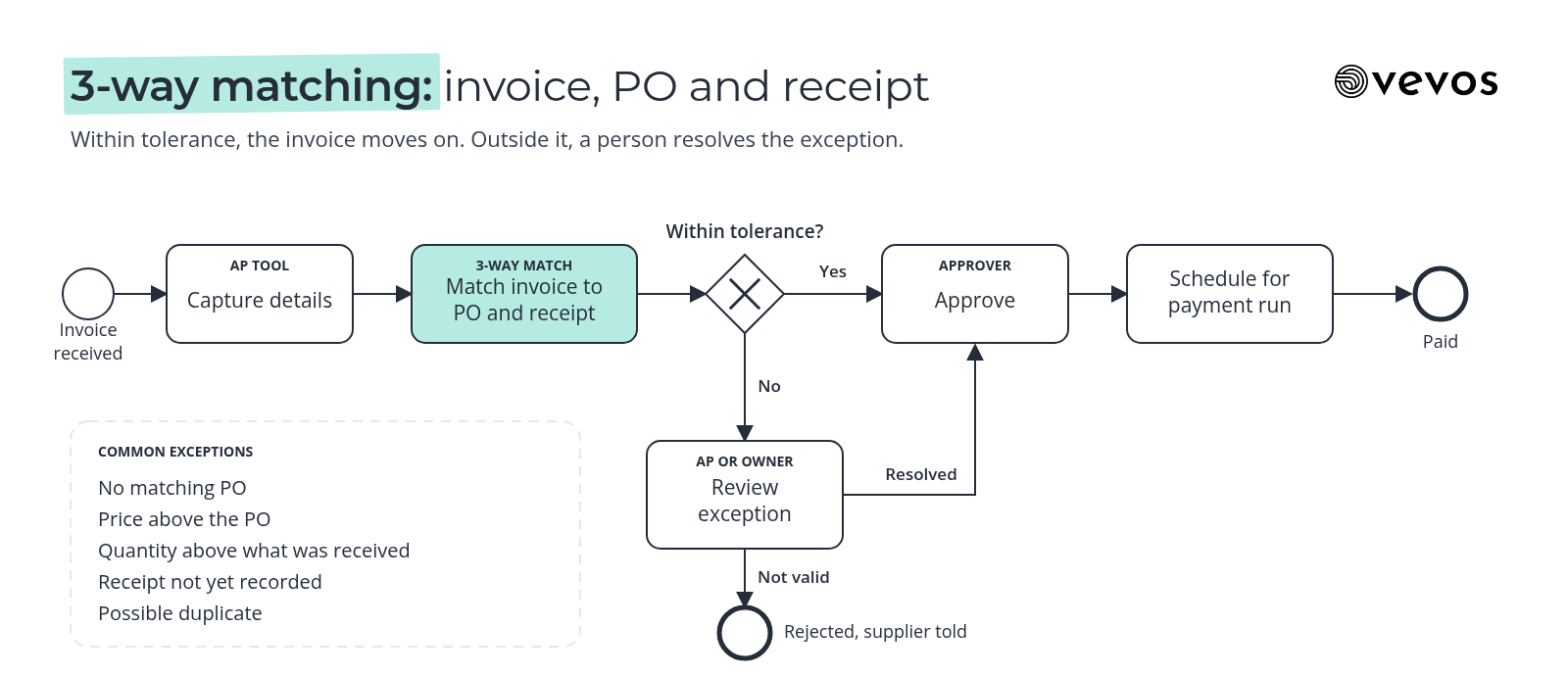
The common exceptions: no matching PO, a price above the PO, a quantity above what was received, a receipt not yet recorded and a possible duplicate. Each one needs an owner and a path.
What features matter most in AP automation software?
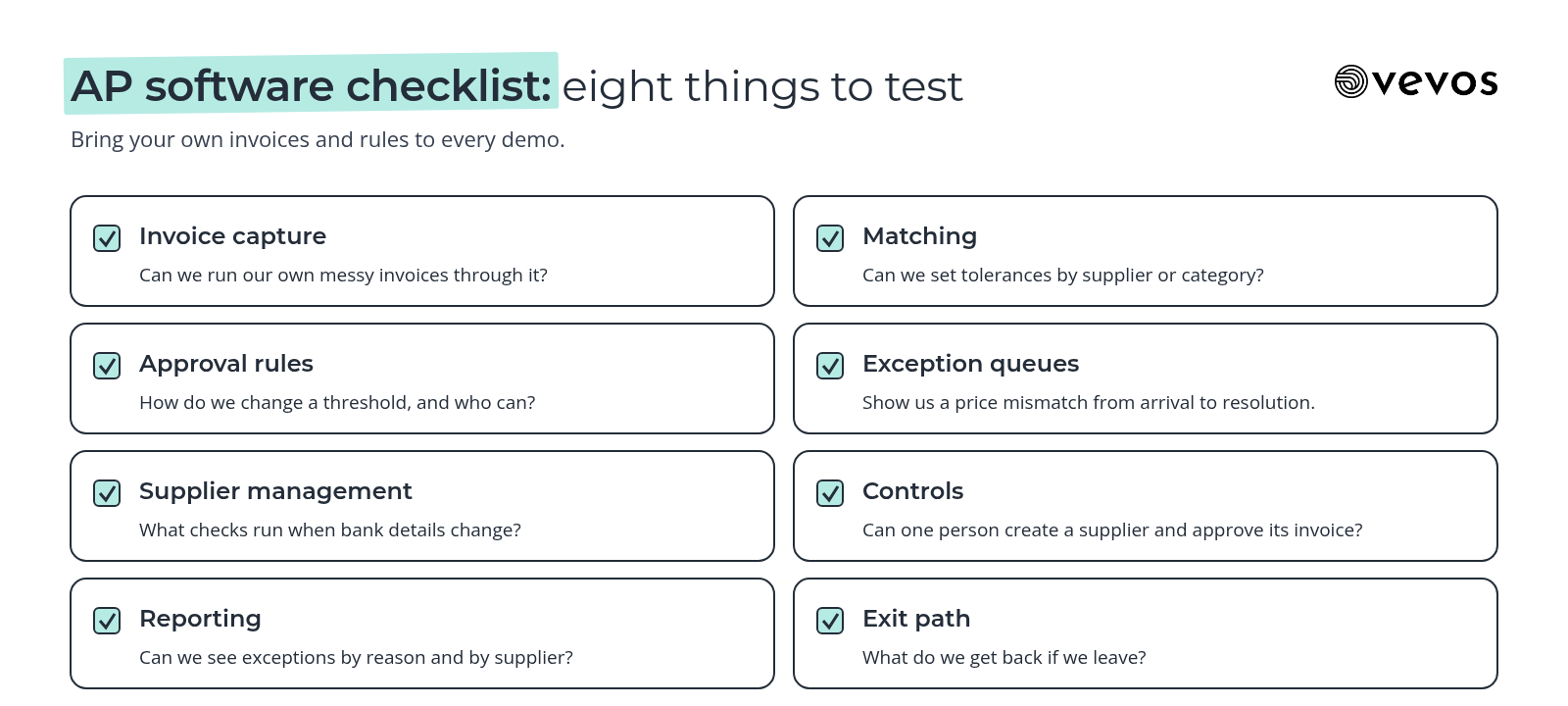
Seven areas: invoice capture, matching, approval rules, exception queues, supplier management, controls and reporting. Check each against your own process, and add an eighth: how you get your data and rules out if you switch tools later. Demos tend to show the clean path, so ask to see the exceptions.
Area | What to check | Question to ask in the demo |
|---|---|---|
Invoice capture | Email, upload and portal intake; how it reads varied layouts | Can we run our own messy invoices through it? |
Matching | Two-way and three-way, tolerances by amount or category | Can we set different tolerances by supplier or category? |
Approval rules | Thresholds, cost centers, delegation when someone is away | How do we change a threshold, and who can do it? |
Exception queues | Reasons, owners, aging and reassignment | Show us a price mismatch from arrival to resolution |
Supplier management | Onboarding, payment detail changes, duplicates | What checks run when bank details change? |
Controls | Segregation of duties, approval limits, a record of who approved what | Can one person create a supplier and approve its invoice? |
Reporting | Cycle time, exception rates, late payments | Can we see exceptions by reason and by supplier? |
Exit path | Export of invoices, rules and history | What do we get back if we leave? |
For the approval matrix itself, including thresholds and delegation, see our guide to the invoice approval workflow. This post doesn't repeat it.
What should you map before evaluating AP tools?
Map your approval thresholds, matching tolerances, exception types and who owns each one, plus how invoices actually arrive and how payment runs are scheduled. With that on one page, every demo becomes a test against your real rules instead of the vendor's example, and gaps show up before you sign.
Intake channels. Every way invoices arrive today, including the ones nobody likes to admit.
Matching rules. Which invoices need a PO, which need a receipt and what tolerances apply.
Approval thresholds. Who approves what, by amount and cost center.
Exception types. The common ones, each with an owner and a target time.
Supplier changes. How new suppliers and payment detail changes are checked.
Payment runs. When they happen and who releases them.
Vevos turns your AP SOPs or a plain description into a BPMN map plus written docs, saves a version with a visual diff when a policy changes and exports the map, so you can test each tool against your real rules. To be clear, Vevos isn't AP software: it doesn't capture invoices, read them or post to your accounting system.
How do approvals and controls fit in?
Controls are the rules that stop mistakes and fraud: segregation of duties, approval limits, a second check on payment detail changes and a record of who approved what. The AP tool should enforce and keep that record. Your process map should show where each control sits, so you can check the tool covers all of them.
Controls worth mapping explicitly:
Segregation of duties. The person who creates or edits a supplier shouldn't approve that supplier's invoices.
Approval limits. Each approver has a ceiling, and anything above it goes up a level.
Payment detail changes. Any change to a supplier's bank details is verified by a second person through a known contact, never only by email.
Duplicate checks. Same supplier, same invoice number or same amount and date gets flagged.
Payment release. The person who releases a payment run isn't the one who approved the invoices in it.
If you document controls for SOX or a similar framework, our guide to SOX internal controls documentation covers what that documentation needs.
What changes by company size?
A 30-person services firm usually needs simple capture, two-way matching, one or two approval levels and a clear exception owner. A multi-site manufacturer needs three-way matching with receipts from each site, tolerances by category, approvals by site and cost center and the same exception rules everywhere.
Smaller firms. Most invoices are for services, so there's often no goods receipt. A two-way match against a PO or contract, an approval by the budget holder and one AP person clearing exceptions daily covers most of it. Keep the tool simple enough that the AP lead can change a threshold without help.
Larger and multi-site companies. Receipts come from several warehouses or plants, and each site has slightly different habits. Agree on one set of matching rules and tolerances, name an exception owner per site and make sure the tool handles approvals by site as well as by amount. Roll out one site first, measure it, then extend.
What does AP automation look like at a multi-site manufacturer?
Take a manufacturer with three plants buying raw materials and parts on POs. Invoices arrive by email to a central AP inbox, goods are received at each plant, and three-way matching decides what's paid automatically. The map shows where the AP tool sits and where people stay involved.
Receipt. Each plant records goods received against the PO. If the receipt isn't recorded, the invoice can't match, so this step needs an owner at every site.
Capture and match. The AP tool captures the invoice and matches it to the PO and receipt. Within tolerance, it moves on. Outside tolerance, it goes to the exception queue with the reason attached.
Exceptions. Price differences go to the buyer who raised the PO. Quantity differences go to the plant's receiving lead. Missing POs go back to the requester. Possible duplicates go to AP. Each exception type has one owner.
Approval and payment. Matched invoices above a set amount need the plant manager's approval. AP schedules approved invoices into the weekly payment run, and finance releases it.
How do you measure AP automation?
Track touchless rate, exception rate by reason, cycle time from receipt to approval and the number of late payments, each against the baseline you recorded when you mapped the process. Those four show whether the tool is reducing manual work, whether your rules are right and whether suppliers are getting paid on time.
Touchless rate: the share of invoices that go from receipt to approved with no manual touch.
Exception rate by reason: price, quantity, missing PO, missing receipt, duplicate. The reasons tell you whether to fix the tool settings, your POs or receiving.
Cycle time: from invoice received to approved for payment.
Late payments: the count of invoices paid after their due date.
Record a baseline before switching anything on, even a month of sampled invoices. Then compare by site and by exception reason, not just in total.
Frequently asked questions
What is AP automation?
AP automation is the use of software to handle the repeatable work in accounts payable: receiving invoices, capturing their details, matching them to purchase orders and receipts, routing approvals and scheduling payments. People stay focused on exceptions, approvals with real risk and supplier changes. The rules the software applies come from your own AP policy.
What is 3-way matching?
Three-way matching checks that the invoice, the purchase order and the goods receipt agree within an agreed tolerance before an invoice is paid. If quantities and prices line up, the invoice moves forward. If they don't, it becomes an exception for a person to resolve, such as the buyer for a price gap or receiving for a quantity gap.
Does AP automation replace AP staff?
It changes the work more than it removes it. Routine invoices that match cleanly need less handling, so AP staff spend more time on exceptions, supplier questions, controls and improving the rules. The team still owns approvals with risk, payment detail checks and payment runs. Plan for that shift rather than a headcount number.
Should I map my AP process before buying software?
Yes. A map of your intake channels, matching rules, approval thresholds, exception types and owners lets you test every tool against your real rules instead of a vendor's demo. It also shows the gaps the tool won't cover, like receiving at a plant or supplier verification, before you've signed anything.
Is Vevos AP automation software?
No. Vevos doesn't capture invoices, read them or post to accounting systems. It maps and documents your AP process in BPMN and keeps versions as policies change. On Tempo and above, Conductor Agents can build and deploy an app from the reviewed model, which calls the tools you choose for steps like reading invoices.
Map the rules, then compare tools
Vevos is the AI Playbook for how companies run. Before your next AP demo, write down your matching tolerances, approval thresholds and exception owners, and bring them to every vendor. Today, Vevos can call a small set of outside tools through connectors your admin approves. Outside AI agents calling Vevos to run your processes are coming.
Describe your process in plain English and get a BPMN map, no account needed. You can start free on Intro. See current limits on the pricing page. Pulse is $9 a month, Rhythm is $29 a month for up to 4 users, and Tempo, where Conductor Agents build apps, is $199 a month.
Related blog posts
- Intelligent Document Processing: Where It Fits in Your Process — Extraction is one step. This guide covers the intake, validation, exception review and approval around it, which documents to start with, and why IDP projects stall after the pilot.
- What Is AI Business Process Automation? — A plain guide to putting AI inside a whole business process: where it beats rules and bots, how to score your first candidate, and a purchase request example from map to app.
- 12 Small Business Processes You're Still Doing by Hand (And Shouldn't Be) — The reason you still do these by hand isn't laziness. It's that every tool made you choose between a flowchart and a developer. Here are the 12.